
Plan completion and task completion
Two analytics sections show whether commitments are being kept: whether scheduled audits are carried out and whether tasks get closed. The plan follows the period, location, checklist and auditor filters; tasks follow only the period and location filters. See Analytics: sections and filters.
Plan completion: how it's counted
Menu Analytics → Plan completion. The data comes from the Planner, and a planned audit is counted by the same rules as in the Planner — so for the same period the numbers of done, overdue and missed audits match.
A planned audit counts as done if an audit with the same checklist was submitted at the same location within the planned date's window: on the day itself or within the plan's tolerance (± N days). It doesn't matter who carried out the audit. One submitted audit counts towards only one planned audit — the one closest by date. An audit marked manually in the Planner with Mark as completed also counts. Learn more in Planned audit statuses.
Each planned audit in the period gets a status:
- Done — a submitted audit was counted, or there's a manual mark;
- Overdue — the date has passed with no audit, but the tolerance window is still open: an audit carried out now will count;
- Missed — the window has closed and there's still no audit.
The calculation includes planned audits that are due — done, overdue and missed. Future audits and today's audits that haven't been done yet don't lower the percentage. Audits that weren't done from cancelled or deleted plans, or from deleted checklists, aren't counted; done ones stay in the statistics.
The period is matched by planned date. The auditor filter selects planned audits assigned to the chosen employees — they're counted the same way, no matter who actually carried out the audit.
Plan completion: metrics
- Plan completion — the share of done audits among planned audits that are due (done, overdue and missed).
- Missed — how many planned audits weren't done and their window has already closed. If there are overdue audits, the line below the number says how many can still be done in time.
- Next 7 days — how many audits are scheduled for the week ahead.
- Unplanned — the share of audits in the period that didn't count towards any planned audit.
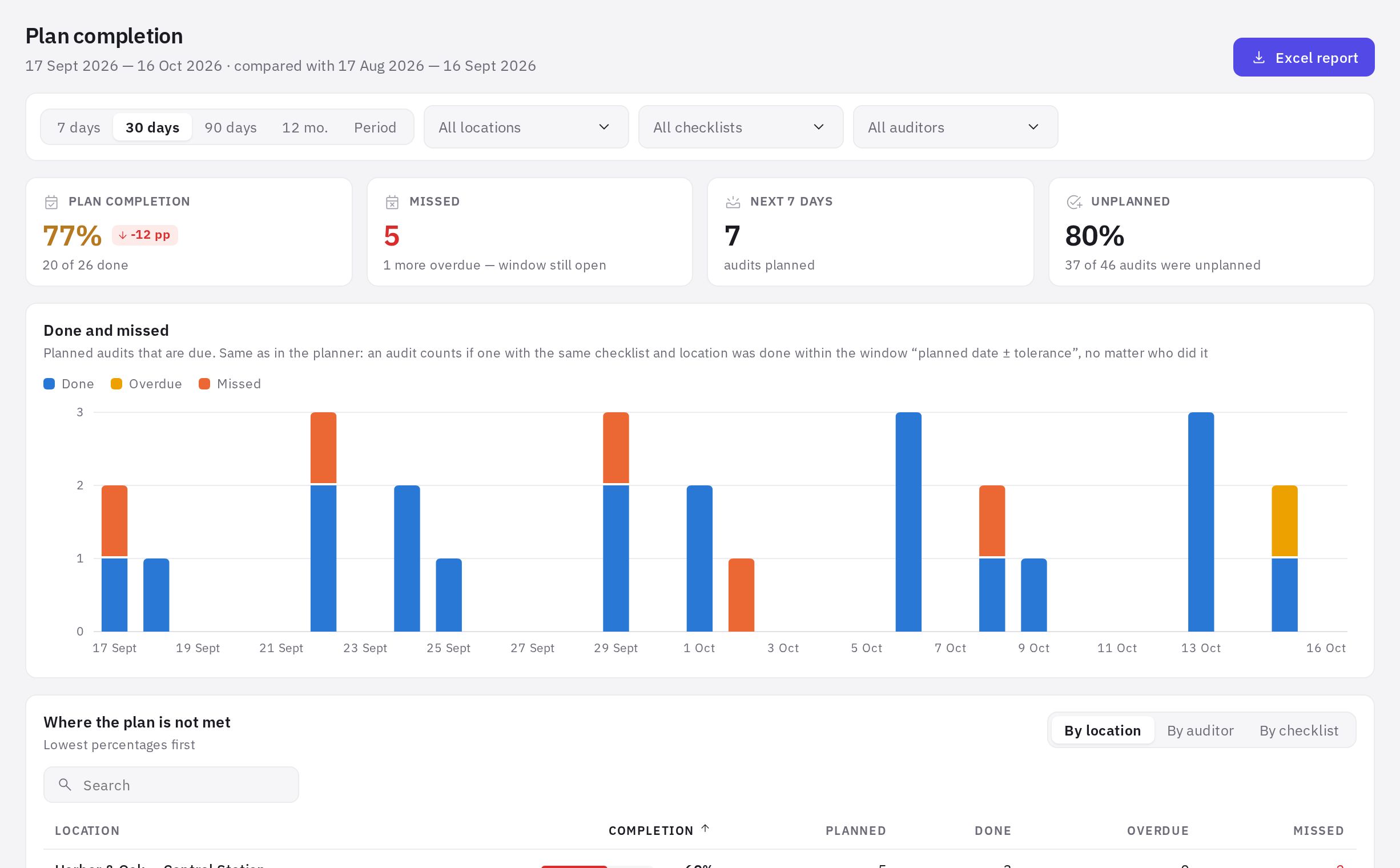
The Done and missed chart shows done, overdue and missed planned audits by day, week or month. The Where the plan is not met table switches between the By location, By auditor and By checklist tabs: Completion, Planned, Done, Overdue, Missed, lowest percentages first. The Missed audits block lists the last 30 misses (only those with the "Missed" status): date, location, checklist, auditor.
If there are no plans in the Planner yet, the page shows an Open planner button.
A high "Unplanned" share with low completion often means audits are done outside the planned date's window or with a different checklist. Widen the tolerance in the plan or move planned audits to the days when people actually visit the locations.
Tasks: what the section shows
Menu Analytics → Tasks: completion. It covers the company's tasks, including those created from audit violations (location tasks where you have the “All location tasks” permission, plus tasks you take part in) — see Tasks.
Tasks are filtered by location only: tasks have no checklist or auditor. Tasks without a location are visible when no location filter is selected.
Cards:
- Open now and Overdue now — the current state, not tied to the period;
- Created in the period and Of which done — how many tasks were created in the period and what share of them is already done;
- Average time to close and Closed on time — for tasks closed in the period.
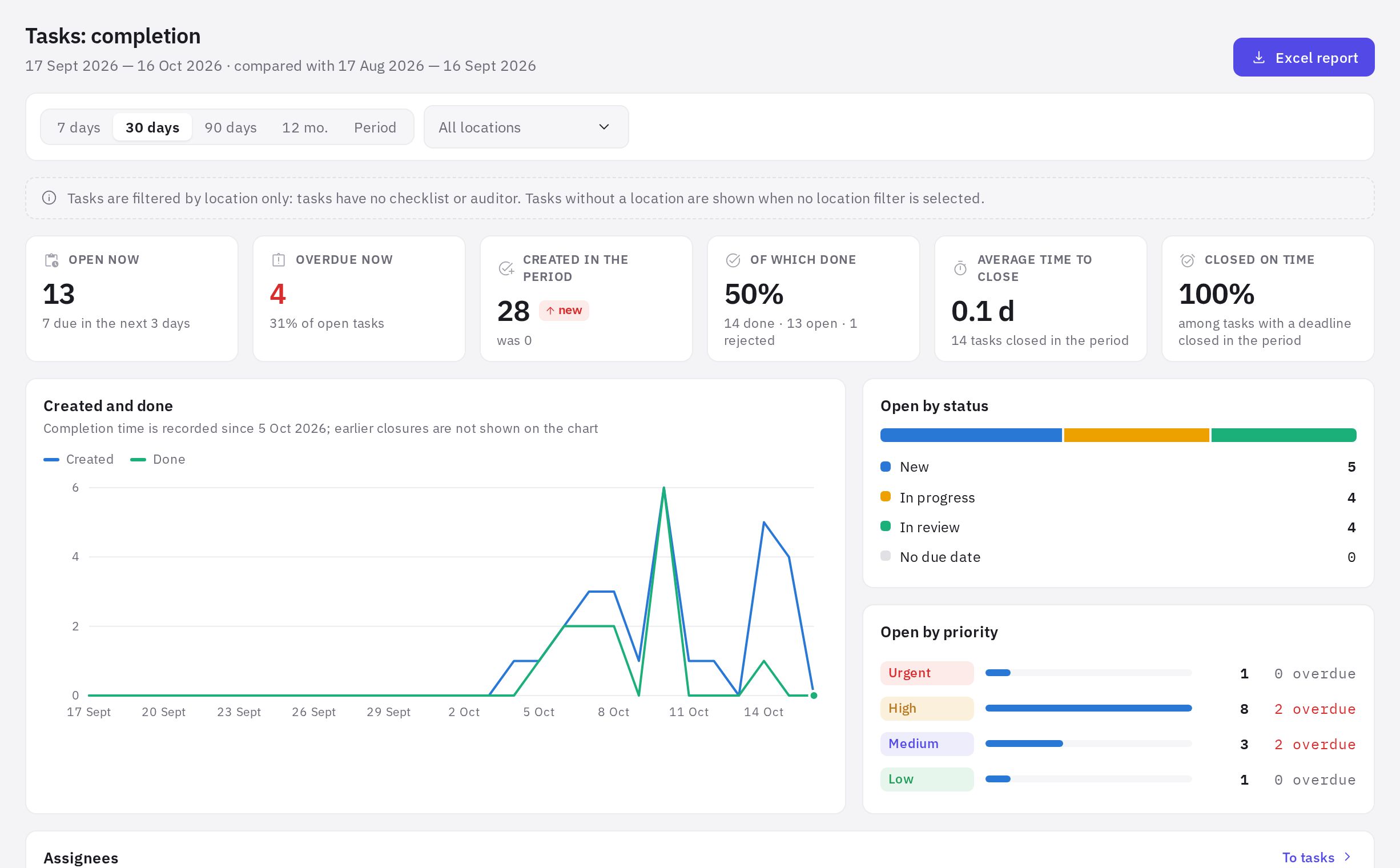
Task closing time hasn't been recorded since the very start of the service: the page shows the date from which it's tracked. Tasks closed earlier aren't included in "Average time to close" and "Closed on time".
Tasks: charts and tables
- Created and done — the flow of tasks by day, week or month.
- Open by status — New, In progress, In review, plus the number of tasks with No due date.
- Open by priority — with the number of overdue tasks for each priority.
- Assignees — Open, Overdue, Assigned in the period, Of which done, Closed in the period, Avg. time, days, On time. A task with several assignees counts for each of them.
- Overdue tasks — the 25 oldest: task, days overdue, due date, assignee, location.
- By location — open, overdue and done tasks by location.
Frequently asked questions
An audit was done, but analytics shows it as "missed". Why?
A planned audit counts only if an audit with the same checklist at the same location was submitted within the planned date's window (± the plan's tolerance). If the audit was done outside the window, at a different location or with a similar checklist, it goes to "Unplanned". Fix it in the Planner — see Planned audit statuses.
Why do the numbers in analytics and in the Planner differ?
The counting rules are the same, so for the same period and the same filters the numbers of done, overdue and missed audits match. A difference is usually down to the period: the Planner shows a calendar month, while analytics shows the selected period (for example, the last 30 days). Also, in the Planner today's audits whose time has come are shown as "In progress", while analytics doesn't count them until they're done.
What's the difference between "Overdue" and "Missed"?
Overdue — the date has passed, but the tolerance window is still open, so the audit can still be done in time and it will count. Missed — the window has closed. Overdue audits already lower the completion percentage, but once done within the window they become done.
Why does "Plan completion" show a dash?
There are no planned audits that are due in the selected period.
Why doesn't "Open now" change when I change the period?
It's the current state of tasks as of today. Only the "in the period" metrics depend on the period.
Thank you! This helps us improve the help center.