
Cash and collection: where the money is right now
The Finance → Cash section shows where the chain's cash is right now and whose hands it has passed through. After a shift, a café cashier or a salon administrator hands in the takings in an envelope to the location safe. A courier collects the envelopes by act and takes them to the main cash office, where an accountant accepts and counts them, and the money is deposited to the bank. At each step the recipient confirms receipt, and any difference becomes a discrepancy that has to be reviewed.
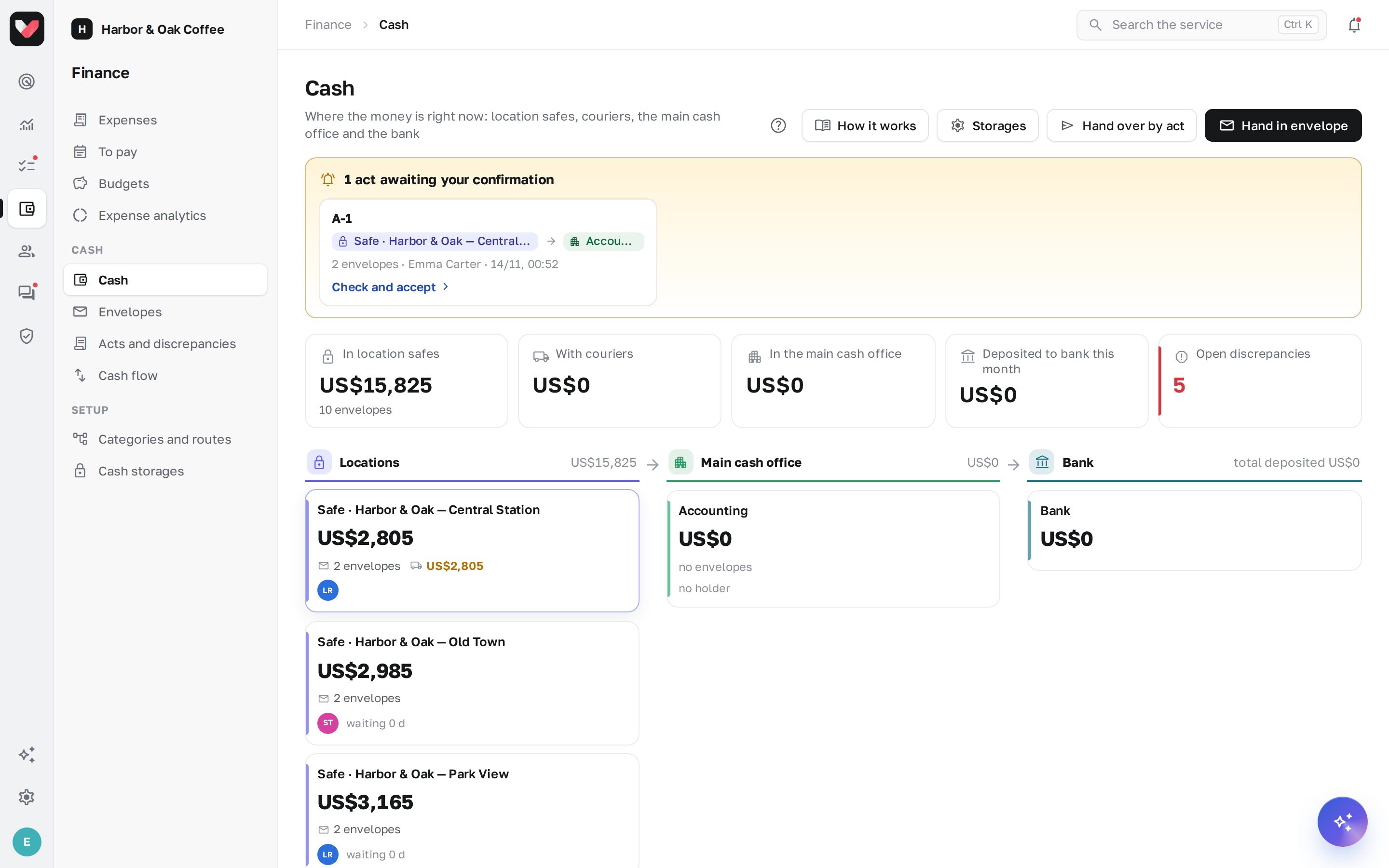
Menu items
The Finance section, Cash group:
- Cash — the overview: how much money is in location safes, with couriers, in the main cash office and how much was deposited to the bank this month, acts awaiting your confirmation, and signals.
- Envelopes — all envelopes: where each one is, who handed it in and whether the amount matched. See How to hand in a takings envelope.
- Acts and discrepancies — the Handovers, Inventories and Discrepancies tabs. See Handover by act and acceptance and Discrepancies and inventory.
- Cash flow — cash in, cash out and balances by storage for a period, Excel export. See Cash storages, rules and cash flow.
The Settings group has the Cash storages item: safes, couriers, the main cash office, the bank and the section rules.
The first time you open the section, a short introduction is shown. You can open it again with the ? button in the header, and the step-by-step guide with the How it works button.
How it works
- The cashier hands in an envelope. After the shift — Hand in envelope: the location safe, cashier, shift, till amount (Z-report), seal number and how much is inside. If the envelope holds less or more than the till, a shift discrepancy appears right away.
- The money is in the location safe. The overview shows how much is in each safe, how many envelopes it holds, how long they've been there and whether the limit is exceeded.
- The courier collects envelopes by act. The safe holder clicks Hand over by act and chooses the courier. Until the recipient confirms, the money stays with the sender, and the envelopes are "in transit".
- The recipient checks and accepts. They mark each envelope "present" and "seal intact", optionally open and count it, and sign. The courier hands envelopes to the main cash office the same way.
- The main cash office deposits the money to the bank. A bank deposit is completed immediately, with a receipt number.
- No difference gets lost. A shortage, surplus or broken seal becomes a discrepancy; the section administrator gets a notification and makes a decision.
Overview
On the Cash page:
- Awaiting your confirmation — acts handed over to you; the Check and accept button opens the act.
- Tiles In location safes, With couriers, In the main cash office, Deposited to bank this month and Open discrepancies.
- Signals: a safe over its limit ("time to collect"), envelopes sitting longer than the set number of days, collection day today.
- The money's path in columns Locations → Couriers → Main cash office → Bank. A storage card shows the balance, how much is in envelopes and outside envelopes, what's in transit, a limit bar and the holders. Click a card to open the storage and work with it.
Export to Excel
Every screen in the section has an Excel button:
| Screen | What the file contains |
|---|---|
| Cash | balances by storage: total, in envelopes, outside envelopes, in transit, number of envelopes, age of the oldest envelope in days, limit; a separate sheet lists acts awaiting confirmation |
| Envelopes | the envelope register with the current filters: shift date, location, current storage, status, seal, POS amount, declared, counted, difference, cashier |
| Acts and discrepancies | three sheets: handover acts, inventory counts, and discrepancies with their resolutions and responsible people |
| Cash flow | income, outgoings and the running balance after each operation for the period — see Cash storages, rules and cash flow |
The file includes only the storages you can see on screen. Every export is recorded in the access log.
Who can do what
Permissions are set in Roles and permissions, group "Cash and collection":
| Permission | What it gives | By default |
|---|---|---|
| Cash: view | safes, envelopes, acts and cash flow of the selected locations | the "Location manager" role — at their locations |
| Cash: location till | hand in an envelope, deposit and pay out cash, hand over by act, accept into the location safe | the "Location manager" role — at their locations |
| Cash: counting | safe inventory with an act | the "Location manager" role — at their locations |
| Cash: reports | cash flow for a period, Excel export | the ready-made "Accountant" role (together with view) |
| Cash: settings | storages and holders, rules, discrepancy decisions, voiding envelopes, any storage | administrator only |
A storage holder (for example, a courier or the main cash office accountant) works with their own storage even without these permissions: sees it, accepts money into it by act and passes it on. Storages without a location — couriers and the main cash office — are visible with Cash: view only with access to all locations.
Plan
The section is included in the Network plan and above. See Plans and billing.
Frequently asked questions
Is jeCheck connected to the till or the bank?
No. The cashier enters the till amount manually from the Z-report, and bank deposits are recorded with an act and a receipt number. jeCheck keeps track of cash and who is responsible for it; it doesn't move money.
Do I need to create a safe for each location?
No. A safe is created automatically for each location when the section is opened, and the location's managers become its holders. The main cash office ("Accounting") and "Bank" are created automatically too. Add couriers in Cash storages — see Cash storages, rules and cash flow.
Can I pay an expense in cash from the till?
Yes. When paying an expense with the "Cash" method, choose the till in the Pay from the till field — the amount is deducted from the storage and recorded in the cash flow. See Paying expenses.
Thank you! This helps us improve the help center.