
Plans and billing
In jeCheck you pay for locations, not for users: you can add as many employees as you like on any plan. There are three plans — Start, Network and Enterprise. You can try Network for free for 2 months.
Where to see your plan
Open Management → Settings → the Plan & billing tab. The Plan & billing and Invoices tabs are visible to the administrator and to employees with the “Plan, payment and invoices” permission — see Roles and permissions. There you'll find:
- the promo card, if your company hasn't activated it yet;
- Current plan — the name and status (“Free forever”, “Trial until …” or “Paid until …”), how many locations you have and how many are allowed;
- a comparison of plans with prices;
- the payment method and payer details.
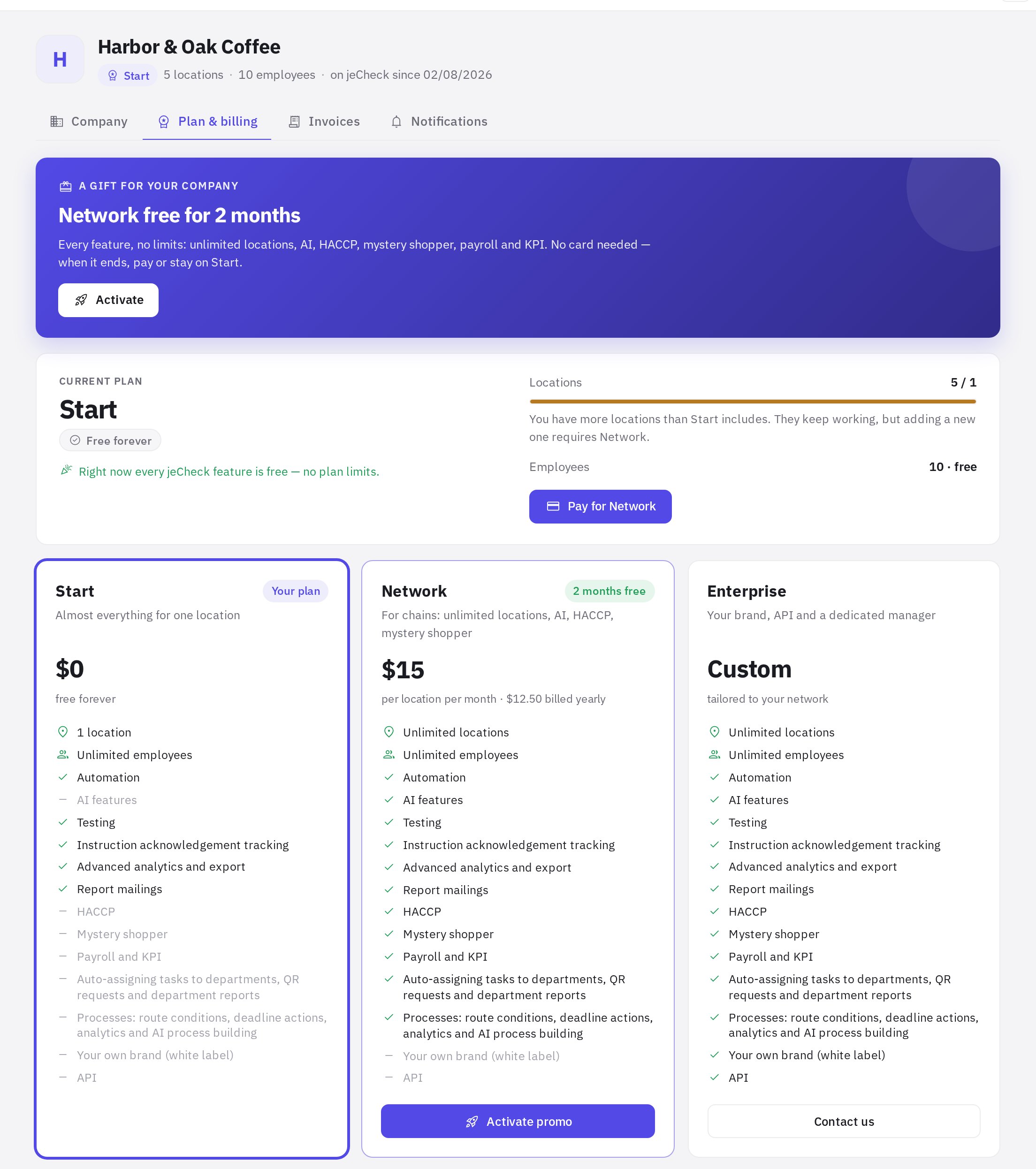
If the tab says “Right now every jeCheck feature is free — no plan limits.”, plan limits don't currently apply to your company: all sections and any number of locations are available.
Promo: Network free for 2 months
Every company can once activate the Network plan for free for 2 months — with all features, no location limit and no card.
- Find the promo card. It's at the bottom of the left menu, on the home page, on the Plan & billing tab and on the screen of a locked section (for example, HACCP or mystery shopper on Start).
- Click “Activate”. Network is enabled right away for 2 months from today.
- Keep an eye on the term. 2 weeks before the end, a card with the number of days left and a Pay button appears in the left menu, and 7 days and 1 day before the end, employees with the “Plan, payment and invoices” permission get an email.
The promo can be activated by the administrator or an employee with the “Plan, payment and invoices” permission; others see a hint to ask the administrator. The promo can't be activated again. If your company has a gift trial from a free visit, the promo extends Network to 2 months from the day of activation.
What happens when the term ends
- You paid — Network keeps working without a break: the paid period starts the day after the promo ends, and the remaining days are not lost.
- You didn't pay — the company moves to Start automatically. All data, locations, checklists, audits and tasks are kept, and the locations keep working. Only adding new locations beyond the limit and the Network features are locked: AI, HACCP (except the Today screen and log entries), mystery shopper, payroll and KPIs. A locked section shows a “… is part of the Network plan” screen with a Plans & billing button. You can get Network back at any time by paying.
Start plan — free
One location, unlimited users, no time limit. It includes every jeCheck feature except mystery shopper, AI, the HACCP module, payroll and KPIs in Work schedule, and priority support:
- checklist builder and templates;
- audits in the mobile app: offline, photos, geolocation, signature;
- tasks, a kanban board and the audit planner;
- processes: requests with a form and an approval, execution and acceptance route;
- automation: scenarios, task assignment by role, “after” photos, reminders, escalations and morning digests;
- employee testing and certification;
- instructions: knowledge base, read confirmation, versions, QR codes;
- work schedule: shifts, clock-in and clock-out, timesheets, time-off requests and shift swaps;
- all analytics, Excel and PDF export, report mailings.
Network plan — per location
$15 per location per month billed monthly, or $12.50 per location per month billed yearly (2 months free). In Kazakhstan: 5,990 ₸ and 4,990 ₸ respectively. Unlimited users at no extra cost. Includes everything in Start with no location limit, plus:
- mystery shopper: visits by link, form review, location ranking and shopper pool;
- AI: audit review, PDF summaries, violation task text, before/after photo checks, test question generation, mystery shopper form review, AI assistant in the web account, AI explanations and autonomous actions in the morning briefing on the home page (the briefing itself and the data checks are available on any plan);
- HACCP module (the Today screen and log entries are available on any plan);
- payroll and KPIs in Work schedule: pay calculation from the timesheet, payroll sheet, payslips, metrics and bonus (the schedule, clock-ins and timesheet are available on any plan);
- processes: route conditions, deadline actions (escalation, auto-approval), process analytics and building a process with AI;
- priority support.
Enterprise plan — custom
Everything in Network, plus white label (the interface and reports under your brand, including your own logo in Settings), the API and MCP server for connecting AI assistants (Claude, ChatGPT, Cursor), and a dedicated manager. Pricing is agreed individually: on the Plan & billing tab, click Contact us on the Enterprise card — the request goes to support.
How to pay for Network
An individual pays by bank card — no contract or company details are needed.
- Open the invoice form. Settings → Plan & billing → Pay for Network (or Pay on the Network card).
- Choose the period. Monthly or Yearly (17% cheaper).
- Enter the number of locations. At least as many as your company has now.
- Check the payer. Payer name and Email for receipts — the payment link and receipt will be sent to this email.
- Click “Issue invoice”. The invoice appears on the Invoices tab with the Awaiting payment status.
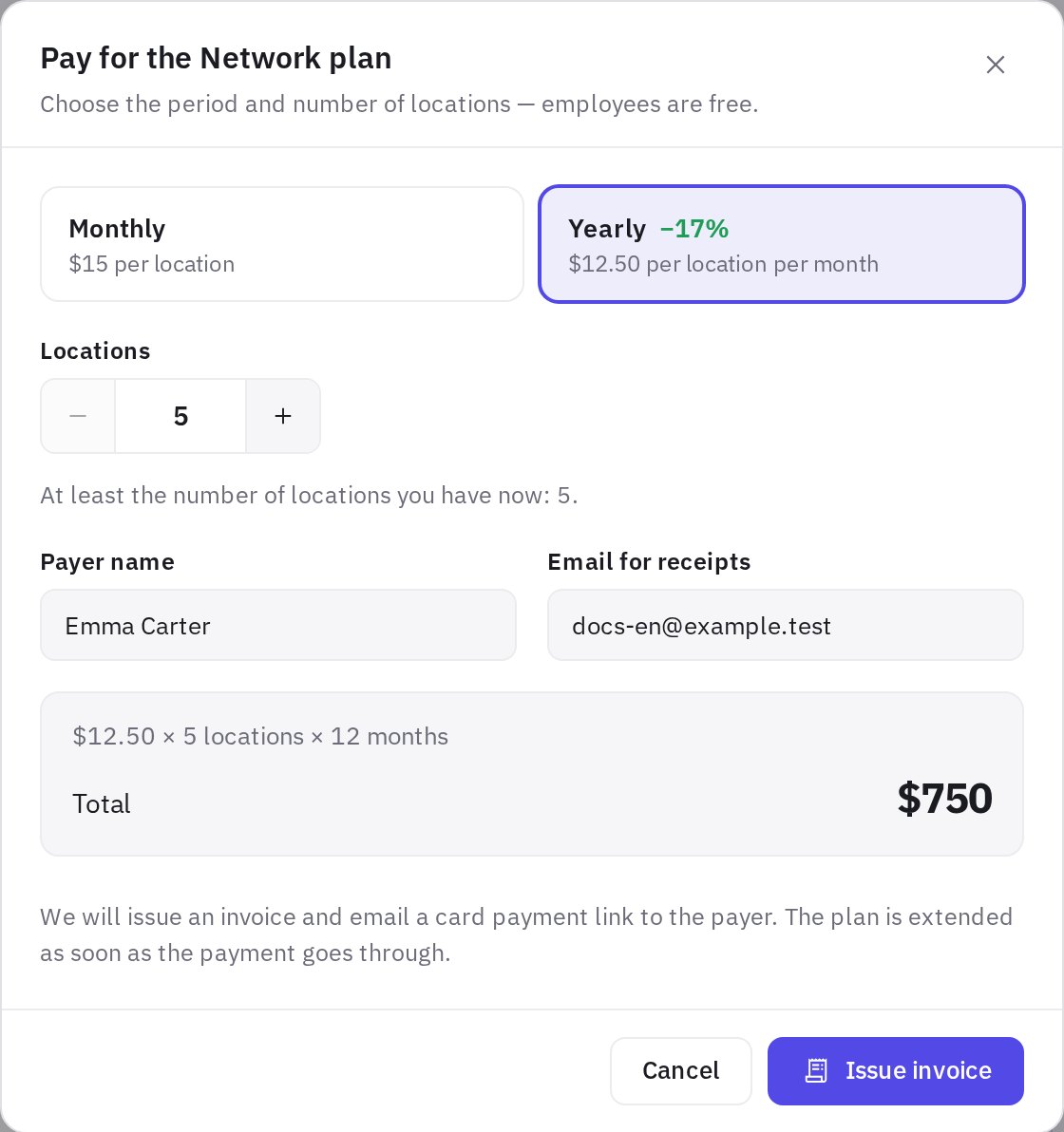
Online payment right in the account is coming soon. For now, after the invoice is issued, the jeCheck team sends a card payment link to the payer's email — usually within one business day. As soon as the payment goes through, the invoice status changes to Paid and the plan to “Paid until …”.
Invoices
The Invoices tab: invoice number and date, the period paid for, Locations, Amount and status. You can open an invoice, print it or save it as PDF, and cancel an unpaid one. There can be only one unpaid invoice at a time: a new one replaces the previous one.
Managed mystery shopping — pay per visit
Ordering mystery shopper visits from jeCheck doesn't depend on your plan: it's available on Start too. No subscription is needed — you pay for each visit by the invoice the manager sends after confirming the request, plus the shopper's purchase by receipt within your limit. For now the service is available only in Kazakhstan. Prices and the estimate are in How to order managed mystery shopping.
Frequently asked questions
What counts as a location?
Any location in Management → Locations: a restaurant, store, club, warehouse or branch. Deleted locations don't count. The number of users, audits and checklists doesn't affect the price.
Do I need a card to start or to activate the promo?
No. Start is free with no time limit, and the Network promo is activated without a card.
Will I lose data if I don't pay after the promo?
No. Everything is kept, and locations beyond the limit keep working — only new locations and paid features are locked until you pay.
Can I activate the promo a second time?
No, the promo is once per company. After it, Network is enabled by paying.
Why is the “Upload logo” button disabled?
A custom logo is part of white label, which comes with the Enterprise plan. When plan limits apply, the button is locked on Start and Network.
Thank you! This helps us improve the help center.