
How the audit score is calculated
An audit score is always a percentage from 0 to 100. How it's calculated depends on the Scoring method in the checklist settings: In percent or In points.
Which answers count
- Norm — a "Yes" answer, an option with the "norm" outcome, a number within the norm, a date that meets the rule, a matching barcode, a rating not below the threshold. The item counts — fully or by its share of the weight (see "Partial score" below).
- Violation — a "No" answer, a violation option, a number outside the norm, an expired date, a rating below the threshold, a different barcode. The item was checked but doesn't count.
- Skip and "Not applicable" options — excluded from the calculation: they neither lower nor raise the score.
- Not scored — Text field, Photo, Signature, Employee, Instruction, as well as a number, date or barcode without a norm. Excluded from the calculation.
In short: the score is based only on items with a "norm" or "violation" outcome. How each answer type produces a norm or a violation is explained in Answer types.
The "In percent" method
All items weigh the same; question weight is ignored.
Score = number of "Yes" answers ÷ (number of "Yes" + "No" answers) × 100%.
Example: a checklist has 10 questions — 8 "Yes", 1 "No", 1 skipped. Score: 8 ÷ 9 = 88.9%.
The "In points" method
Each item is worth as many points as set in the Weight in points field.
Score = sum of weights of "Yes" items ÷ sum of weights of "Yes" and "No" items × 100%.
Example: four questions weighted 1, 1, 1 and 5. The item weighted 5 is a violation; the rest are "Yes". Score: 3 ÷ 8 = 37.5%. The same audit using the "In percent" method would score 75%.
The "In points" method works well when violations aren't equal: an expired product matters more than dust on a windowsill. Give critical items a higher weight — a single such violation will noticeably lower the score.
Partial score
With Answer options, Multiple choice and Rating scale, a norm answer can earn a share of the item's weight rather than all of it: an option "Some concerns" with a 50% share earns half, a rating of 4 on a 1–5 scale earns 75%. With the "In percent" method such an item counts as 0.5 or 0.75 of an item, with "In points" — as half or three quarters of its weight.
Example: an "In points" checklist with questions weighted 3, 1 and 1. The first is violated, the second is answered "Some concerns" (50%), the third "Yes". Score: (0 + 0.5 + 1) ÷ 5 = 30%.
Items that zero the score
If Zeroes the audit score is on for a question, a violation in it gives the whole audit 0%, however well the other items went. The report shows "Score set to zero: violation in …" under the score, and the item itself is marked "Zeroes the audit score". Section scores are calculated as usual. Turn it on for items that mean the audit can't be considered passed: an expired product, a dangerous storage temperature, an employee without a health certificate.
Score by section
Each section's score uses the same formula, but only for that section's questions. It appears in the report's Score by section block.
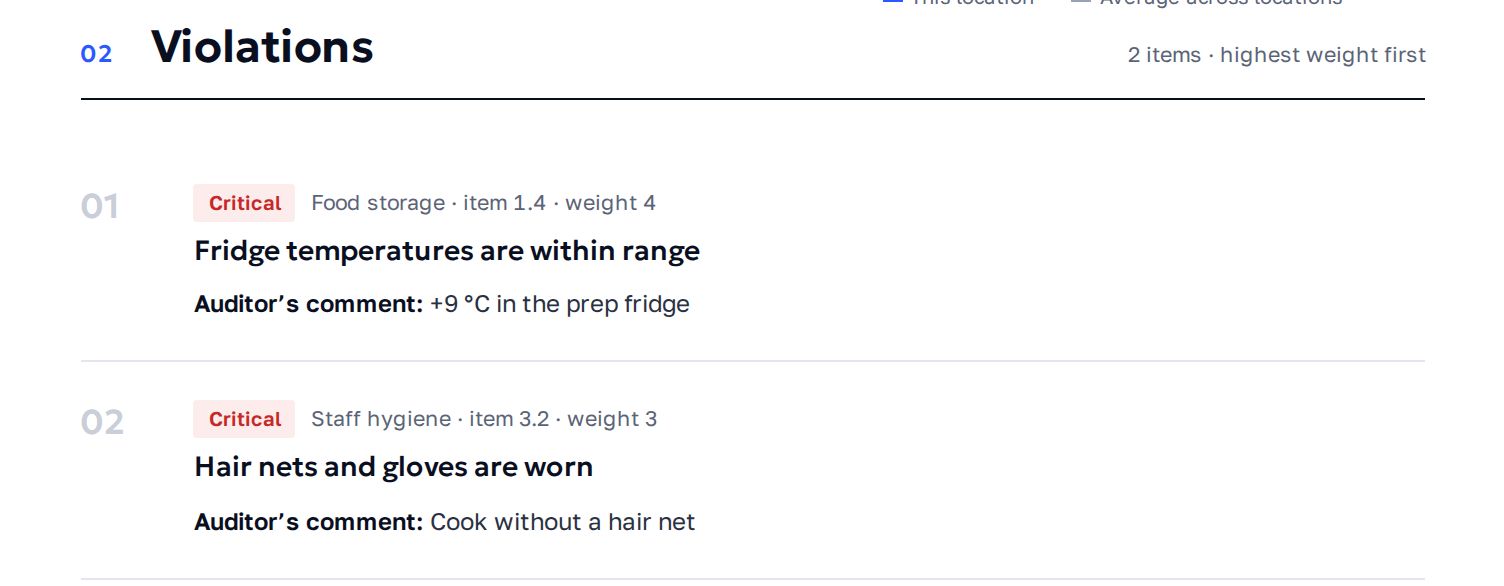
Critical and important violations in the report
If question weights in the checklist differ, the report marks violations by weight:
- critical — the item's weight is at least half of the maximum weight among checked items (and above the minimum);
- important — the weight is above the minimum but below half of the maximum.
If all items have the same weight, there are no marks. Violations in the report are sorted with the heaviest first. For critical violations, the report shows a forecast: what the score would be once they are fixed.
Target and status in the audit report
The target comes from this checklist's mailing list setting — the Send the report if the result is below field (a value from 1 to 100). See Report mailing lists.
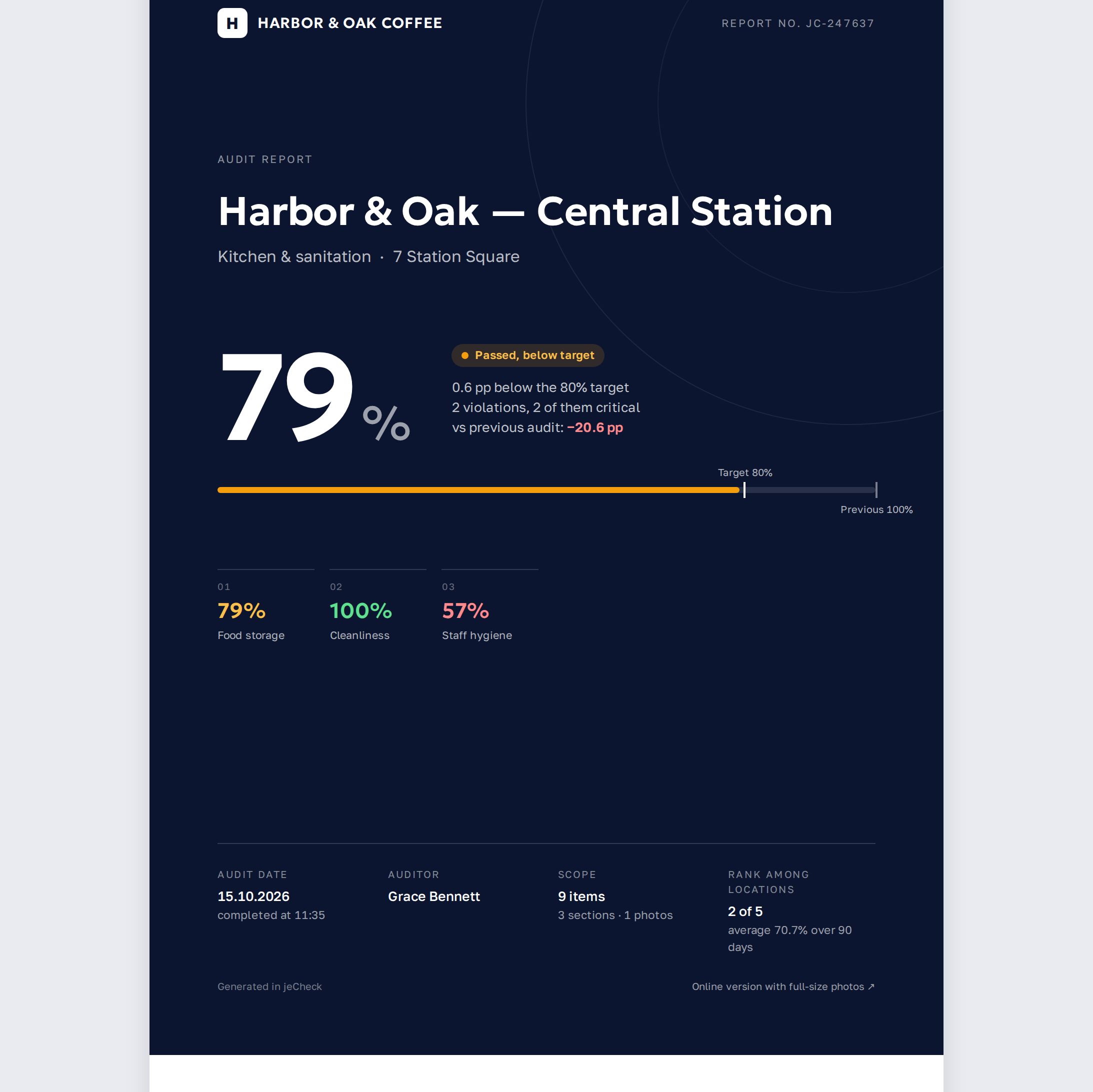
The status in the report is consistent with the audit log: an audit scoring below 70% always gets the Audit failed status (red) — in the log it's "Failed".
If the score is 70% or higher and a target is set:
- score at or above the target — Target met (green);
- below the target — Passed, below target (yellow). The report header shows how many percentage points the score is below the target.
If the score is 70% or higher and no target is set:
- 90% and above — Excellent (green);
- 70% to 89% — Audit passed (yellow).
If the checklist has several mailing lists with thresholds, the target is the highest threshold among the mailing lists that apply to the audited location. The same rules color the section scores, and the legend under the sections table labels the levels.
Threshold in the audit log and analytics
The Audit log and Analytics use a single 70% threshold: an audit scoring below 70% gets the Failed status, and the "audits passed" metric counts the share of audits scoring 70% or higher. Score colors: 90% and above — green, from 80% — blue, from 70% — yellow, below 70% — red.
The 70% threshold is shared by the report, the log and analytics. The mailing list target only refines the status of a passed audit — "Target met" or "Passed, below target" — so an audit can never fail in the report while passing in the log (or vice versa).
Frequently asked questions
Why didn't a skipped question lower the score?
Skipping means "not applicable" and is excluded from the calculation — the score is based only on "Yes" and "No" answers.
Can I create an item whose violation zeroes the whole audit?
Yes. Open the question in the builder and turn on Zeroes the audit score in the Logic and importance block. A violation in this item gives the whole audit 0%.
Why does question weight have no effect?
The checklist uses the In percent method. Open the builder, click Settings and choose In points.
Why is a points-based score still shown as a percentage?
In jeCheck the score is always the share of points earned out of those possible — this way audits on different checklists can be compared with each other.
Thank you! This helps us improve the help center.