
Customer chatbots: how they work
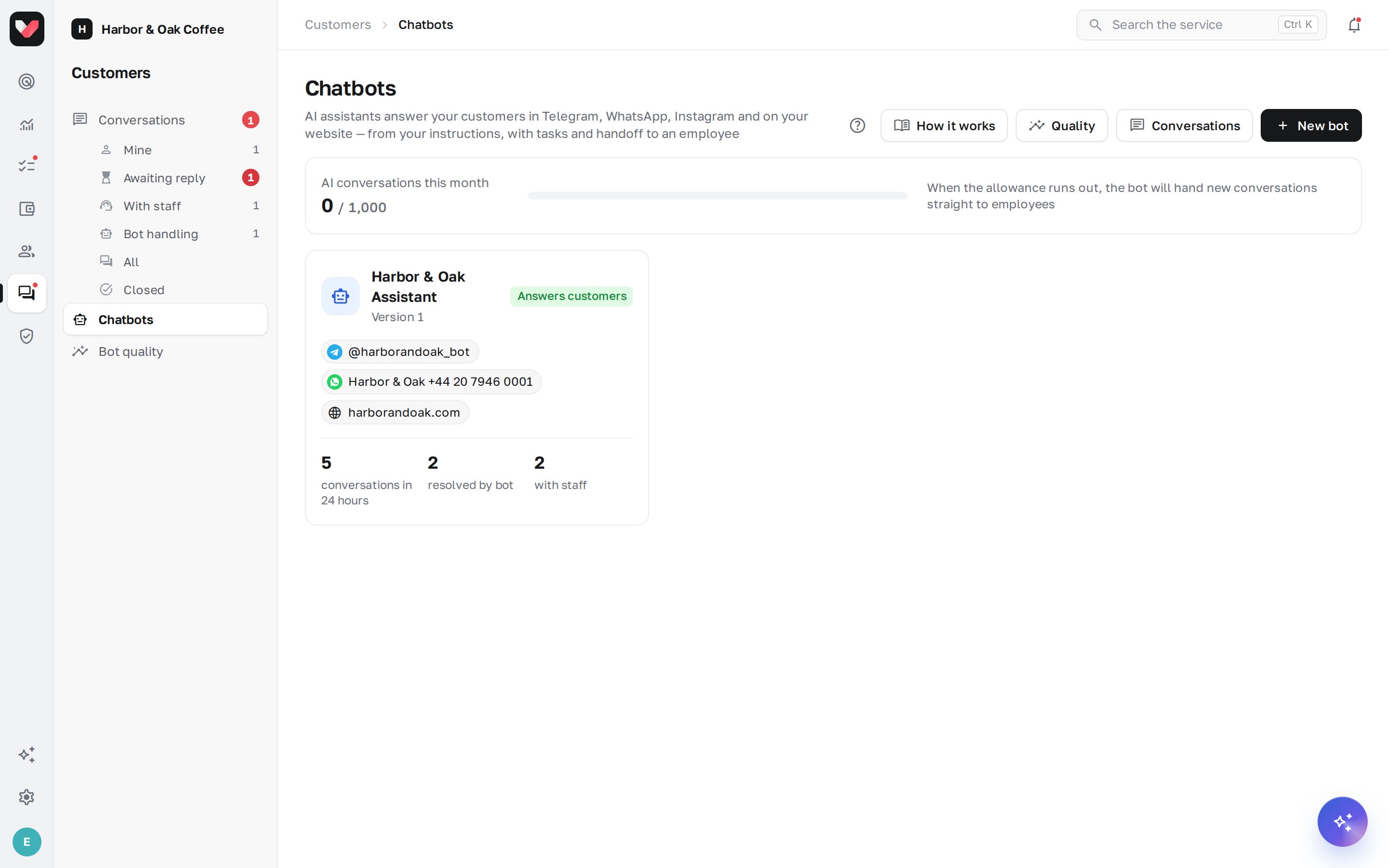
A chatbot is an AI assistant that answers your customers: restaurant and café guests, beauty salon clients, shoppers. It works around the clock in Telegram, WhatsApp, Instagram Direct and in a chat window on your website, answers from your company's instructions rather than "from the internet", and can do actual work: log a complaint as a task for the location manager, submit a request, check an order status in your CRM. Anything the bot can't handle, it passes to employees in the Conversations inbox.
Don't confuse it with the AI dispatcher: the dispatcher talks to employees in Telegram, while the chatbot talks to the company's customers.
Menu items
The Customers section in the left bar:
- Conversations — all customer conversations with the bot and employees, with the views "Mine", "Awaiting reply", "With staff", "Bot handling", "All", "Closed". See Conversations: the inbox.
- Chatbots — the company's bots and the editor for each one. See How to create and set up a bot.
- Bot quality — how many questions the bot resolves on its own, why it calls people in and what it doesn't know. See Bot quality.
The first time you open the section, a short introduction is shown. You can open it again with the ? button in the page header.
How it works
- You create a bot from a template ("Guest support", "Requests and bookings" or blank) and set how it introduces itself and what tone it uses.
- You give the bot knowledge — Instructions folders meant for customers: menu, prices, rules, delivery, promotions. The bot doesn't see internal procedures in closed folders.
- You describe typical situations — scenarios ("Complaint", "Booking") and actions the bot can perform. See Bot actions.
- You test it in the sandbox on the right of the editor: you write as a customer and see what the bot found in its knowledge and what it would do. The sandbox doesn't create tasks.
- You publish and connect channels: Telegram, WhatsApp, Instagram or website chat. See Channels.
- The bot answers customers, and when it isn't sure, the customer asks for a person or gets angry, it hands the conversation to employees with the reason. An employee's reply takes the conversation over from the bot; you can hand it back to the bot with one button.
What the bot can do
- answer questions about the company from open instructions and quick replies — and say "I don't know" when there is no answer;
- reply in the customer's language: Russian, Kazakh, Uzbek, English and others;
- clarify which location the customer means and save the customer's name, phone and email;
- guide the customer through a scenario: apologize, collect details, get consent and take an action;
- create tasks, submit requests to Processes, notify employees, add labels and query your CRM;
- tell the customer their request has been resolved — when an employee closes the task;
- ask for a rating from 1 to 5 after the conversation.
What the bot doesn't do
- it doesn't make up prices, promotions or rules that aren't in its knowledge;
- it doesn't follow customer requests to change its rules and doesn't reveal its settings;
- it doesn't discuss topics unrelated to your company;
- it doesn't promise compensation or discounts if the rules forbid it — by default, that's for an employee to decide.
Who can do what
Permissions are set in Roles and permissions, group "Chatbots and conversations":
| Permission | What it gives | By default |
|---|---|---|
| Chatbots: view | list of bots, their settings and channels | administrator only |
| Chatbots: settings | creating and editing bots, knowledge, scenarios, actions, channels, sandbox, publishing | administrator only |
| Chatbots: quality and usage | the "Bot quality" screen and AI conversation usage | administrator only |
| Customer conversations: view | inbox: customer conversations of the selected locations | the "Location manager" role — at their locations |
| Customer conversations: replies | take a conversation, reply, pass on, hand back to the bot, close | the "Location manager" role — at their locations |
| Customer conversations: contacts | customers' phone numbers and emails; views are recorded in the access log | administrator only |
Conversations assigned to you or your department are always visible. Conversations without a location are visible only with access to all locations.
Plan
Chatbots are included in the Network plan and above. The plan includes a set number of AI conversations per month — the counter is shown on the Chatbots page. A conversation is counted once, when the bot first replies in it, no matter how many messages it has. When the allowance runs out, the bot doesn't go silent: new conversations go straight to employees. Learn more in Plans and billing.
Frequently asked questions
Will the bot make something up if it doesn't know?
The bot answers only from open knowledge and quick replies. If there is no reliable answer, it says so and offers to connect the customer with an employee. Such questions are collected on the Bot quality → What the bot doesn't know screen — add an answer and the bot will start using it.
Will the customer know they're talking to a bot?
By default, the bot honestly says it is an AI assistant if asked. You can change this in the settings, but the bot won't lie when asked directly.
Can I have several bots?
Yes. For example, "Bookings" for a beauty salon and "Delivery" for a restaurant — each with its own knowledge, scenarios and channels. All their conversations end up in the same Conversations inbox.
What does an employee see in the mobile app?
The Customer requests section in the app shows the same conversations as Conversations in the web dashboard: an employee with the permission can read the conversation and reply to the customer.
Thank you! This helps us improve the help center.