
Conversations: the inbox for customer chats
Customers → Conversations is one window for all customer chats: from Telegram, WhatsApp, Instagram and the website chat. The bot replies on its own, and an employee sees each of its replies and steps in when needed: the bot handed over a question, the customer is unhappy, or you simply want to reply personally.
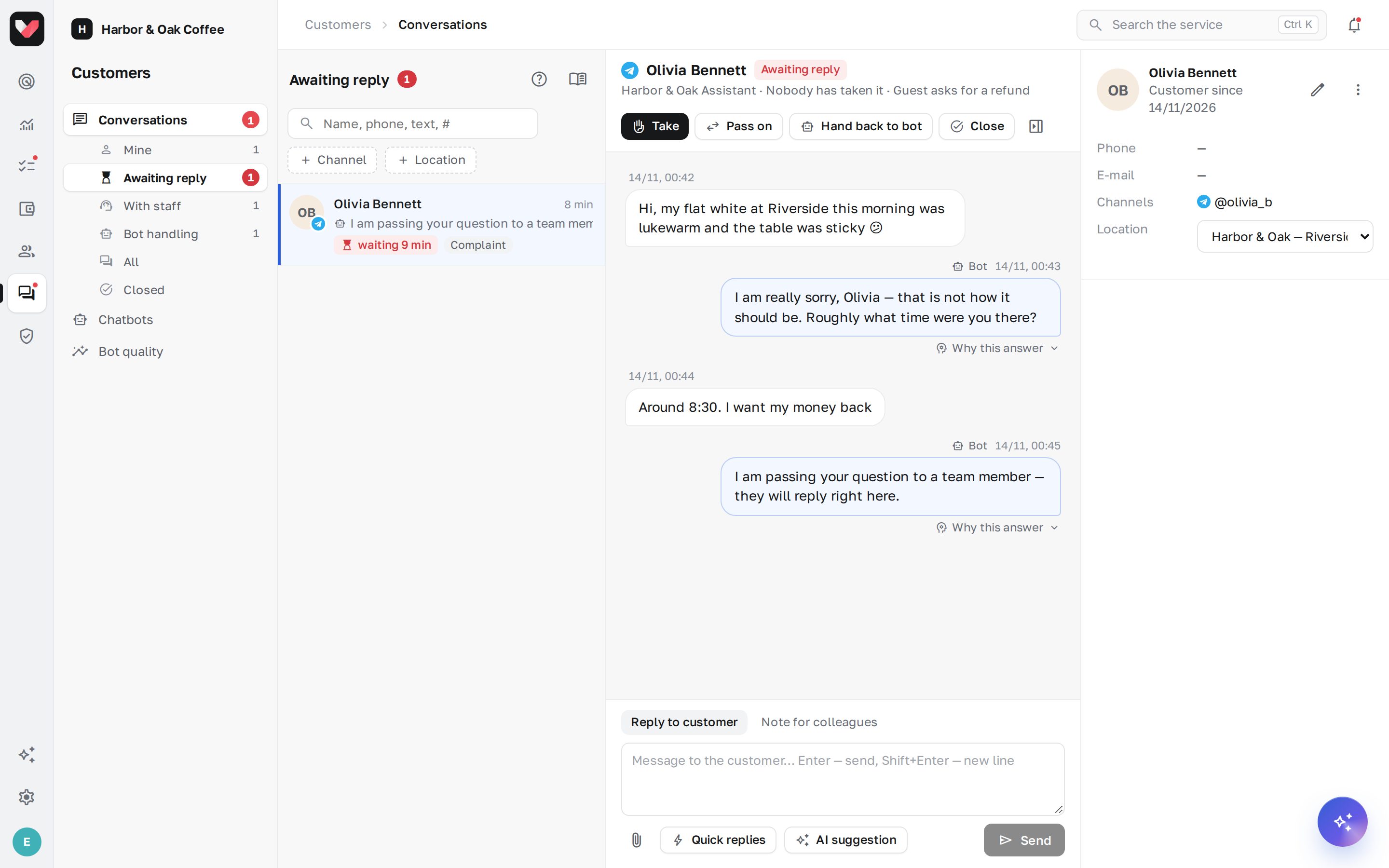
Views
Under the Conversations item in the left menu are views with counters:
| View | What's in it |
|---|---|
| Mine | open conversations assigned to you |
| Awaiting reply | the bot handed the conversation to people and nobody has replied yet — a red counter |
| With staff | conversations handled by employees |
| Bot handling | the bot replies on its own |
| All | all conversations visible to you |
| Closed | finished conversations |
Above the list: search by name, phone, text and conversation number, and filters by channel, bot, location and department. The counter under Conversations shows how many customers are waiting for a reply. You can turn on browser notifications with the button at the bottom of the list.
The conversation
In the center: the customer's messages (left), replies from the bot and employees (right), service lines ("The bot handed the conversation to employees: the customer is asking for compensation") and colleagues' notes.
A bot reply has Why this answer: what the bot searched for in its knowledge, which instructions it used, which scenario it opened and which actions it took. If no answer was found in the knowledge, you can see that too.
How to reply
- Open the conversation and write a message. Enter — send, Shift+Enter — new line.
- An employee's reply takes the conversation over from the bot: the bot stops replying, the conversation moves to "With staff" and is assigned to you.
- Helpers when replying:
- Quick replies — ready-made texts from the bot settings;
- AI suggestion — a draft reply based on the conversation history and the company's knowledge; check it and send;
- the paperclip — attach a photo or a document.
- Note for colleagues — the switch above the input field. Only employees see the note; it isn't sent to the customer.
In WhatsApp and Instagram you can message a customer within 24 hours of their last message. If the window is closed, a warning appears above the input field.
Actions in the conversation header
- Take — assign the conversation to yourself without replying.
- Pass on — to a colleague or a department. The colleague gets a notification.
- Hand back to bot — the bot replies on its own again (if the bot is on).
- Close — with a summary and, optionally, a request to the customer to rate the conversation from 1 to 5. If the customer writes again, a new conversation opens.
Customer card
On the right is the card: name, phone and email (with the Customer conversations: contacts permission), the customer's channels, location, labels, a note, past conversations, ratings and Requests and tasks created from conversations. One customer across different channels is merged by phone number.
The pencil — edit the customer's details. The ⋮ → Block menu — the bot stops replying to this customer (for example, in case of spam); their messages are still visible to employees.
Who sees conversations
- with the Customer conversations: view permission — conversations of your locations; conversations without a location — only with access to all locations;
- conversations assigned to you and your department — always;
- replying requires the Customer conversations: replies permission. Location managers have both permissions for their locations by default.
In the mobile app
The Customer requests section in the jeCheck app shows the same conversations: an employee can read the chat and reply to the customer. A reply from the app also takes the conversation over from the bot.
Frequently asked questions
The customer replied after the conversation was closed — what happens?
A new conversation opens, and the bot replies again. If the customer simply sent a rating (a number from 1 to 5) within 24 hours of the rating request, it's saved in the closed conversation.
Why can't I see a conversation my colleague is talking about?
Most likely it's at a location you don't have permission for. Ask your colleague to Pass on the conversation to you — assigned conversations are always visible.
Where are the old Telegram and WhatsApp "Customer requests"?
They have been moved to Conversations as closed conversations — find them in the Closed view or by search.
Thank you! This helps us improve the help center.