
HACCP in jeCheck
The HACCP section is a separate food safety module, independent of checklists. It keeps scheduled measurement logs, automatically turns any out-of-limit value into a deviation, and builds a HACCP plan following the 12 steps of the Codex Alimentarius. The country profile defines the regulations, log forms and limits.
Menu items
The left menu has a HACCP group:
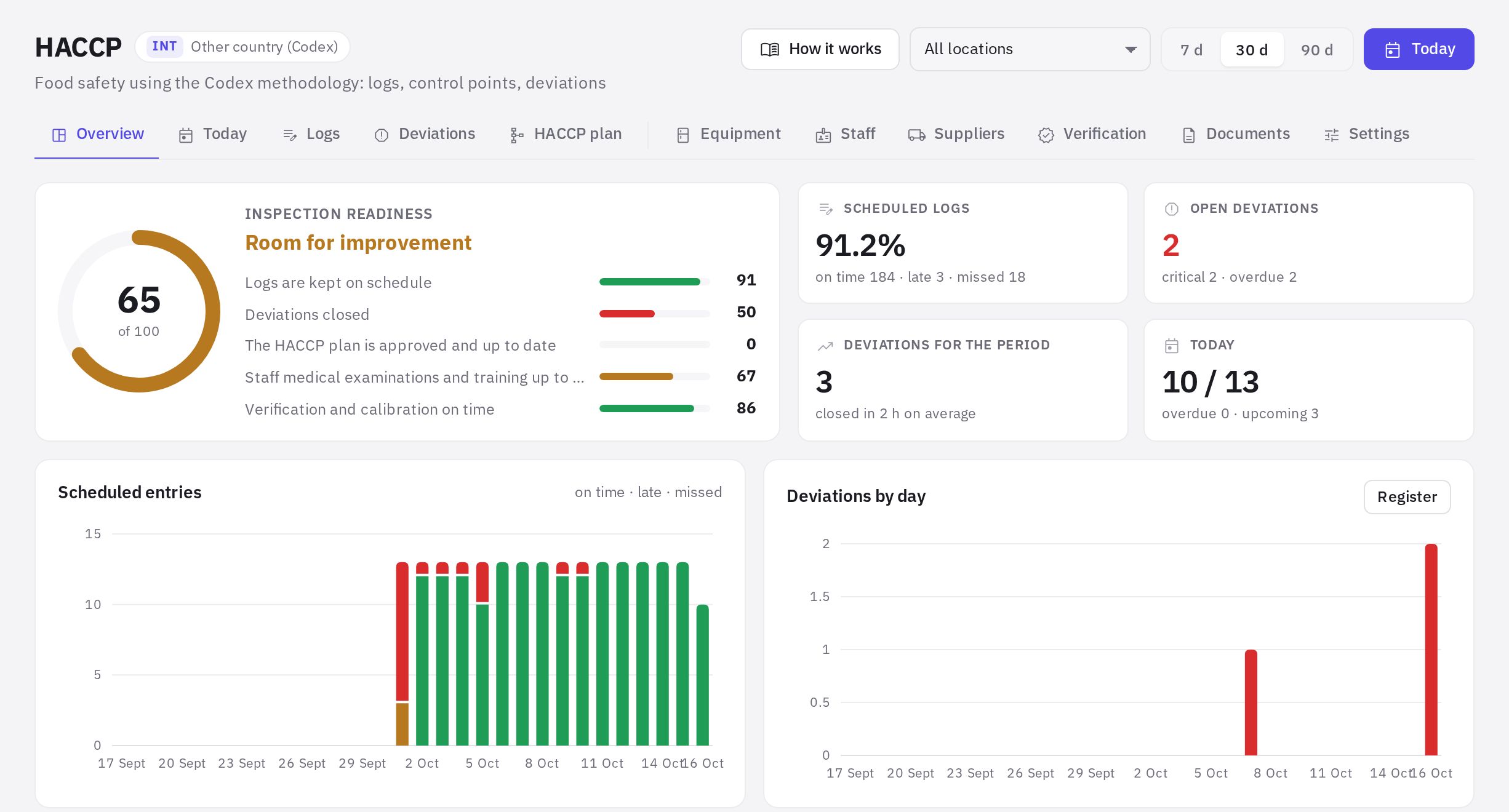
- HACCP overview — inspection readiness, log completion, deviations, control point charts and upcoming deadlines;
- Today — what needs to be filled in at the location right now; handy to open on a tablet or phone in the kitchen;
- Logs — the company's logs with their fields, limits, schedule and all entries;
- Deviations — the register of deviations and corrective actions;
- HACCP plan — the 12-step plan with versions and approval;
- HACCP directories — equipment, staff, suppliers, verification, documents and module settings.
Country profiles
The profile is chosen when you launch the module and can be changed in the settings. It determines the log templates, equipment types, staff documents and print forms.
| Profile | What it covers |
|---|---|
| Kazakhstan | HACCP is mandatory; logs and limits follow the sanitary rules for food service facilities |
| Russia | HACCP is mandatory; the log forms are recommended, and some limits (storage, serving) are set by the business itself |
| Uzbekistan | HACCP is voluntary; logs follow the mandatory sanitary requirements for food service |
| Other country (Codex) | the Codex methodology without national regulations; the company sets all numeric limits |
Regulations in the templates cite the document and clause. If a clause hasn't been checked against the original source, it's marked “check against the document”. The list of the profile's regulatory documents is available in the launch wizard and in the Documents directory.
The limits in the templates are starting values based on your country's regulations as set in the profile. Check them against your own process documents and the manufacturer's conditions for the products.
Launching the module
Until HACCP is set up, an administrator or an employee with the “HACCP settings, logs and sites” permission who opens the section is taken to the five-step HACCP launch wizard:
-
Country and regulations. Choose the country profile. You'll see whether HACCP is mandatory and the profile's regulatory framework.
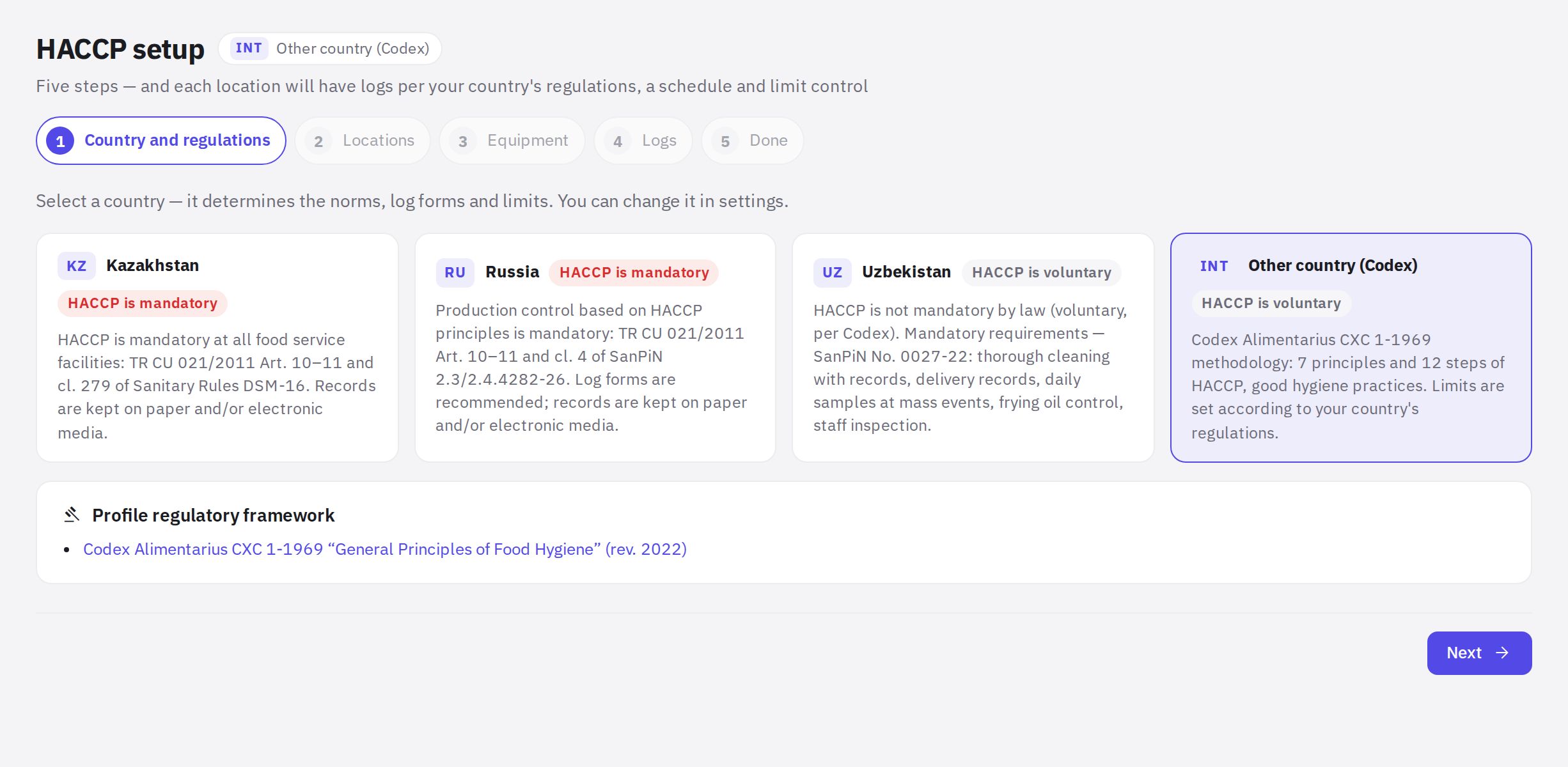
The HACCP setup wizard, "Country and regulations" step -
Locations. Tick the locations where HACCP is kept and set the Facility type, Seats and Shift start. The type determines the mandatory logs and laboratory testing.
-
Equipment. Add fridges, freezers, storerooms and other equipment for each location — each item gets its own row in the log and its own range.
-
Logs. Tick the log templates. The ones recommended for your country are already selected.
-
Done. Set the HACCP team leader, Time zone and Default shift start, then click Launch HACCP.
You can open the wizard again: HACCP directories → Settings → Setup wizard.
Who can do what
- Module permissions are set in Roles and permissions, group “HACCP”: viewing logs and deviations, filling in logs, handling deviations, closing critical deviations, employee health records, editing directories, the HACCP plan and settings. Permissions for logs, deviations and health records can be limited to specific locations; directories, the plan and settings apply to the whole company. The ready-made “HACCP technologist” role includes all of them; an administrator can do everything.
- Location managers by default (the “Location manager” role) see the logs of their locations, correct and annul entries, work on deviations and close non-critical deviations.
- Location employees by default (the “All employees” role) see the logs of their locations and fill them in if their job title is among the log's responsible roles or no responsible roles are set.
Employees see only the locations where they have the “HACCP: logs and deviations” permission — by default their own locations: where they work or manage, plus the location of today's shift. If there are none, the Today page shows “No locations available”.
Inspection readiness
On the HACCP overview page, the “Inspection readiness” score (out of 100) is made up of five parts: logs kept on schedule, deviations closed, HACCP plan approved and up to date, staff medical checks and training valid, verification and calibration on time. Hover over a part to see an explanation. The filters at the top are location and a period of 7, 30 or 90 days.
Plan
The module is included in the Network and Enterprise plans. The Today page and entering log records are not restricted by plan.
Frequently asked questions
Can logs be filled in from a phone or tablet?
Yes. Open the web account in a browser and go to HACCP → Today: the page is designed for tablets and phones, with large buttons.
Can I change the country after launch?
Yes, in Settings → Country regulations. New templates and forms will follow the selected country's regulations, but existing logs, their limits and entries won't change — review them manually.
Can temperature sensors or accounting systems be connected?
No. Entries are made manually.
Thank you! This helps us improve the help center.