
HACCP deviations and corrective actions
A deviation opens automatically when a log entry value exceeds the critical limit, an unacceptable option is chosen, or a “Yes / No” answer doesn't match the norm. It can be closed only after corrective actions: a correction, a product decision and, for critical deviations, the cause and measures against recurrence.
How a deviation is raised
When an employee saves an entry with an out-of-limit value, the form warns them in advance: “Value out of limit: a deviation will be opened after saving”. The deviation immediately appears:
- in HACCP → Deviations;
- on that location's Today page, in the Deviations: corrective actions required block;
- in the HACCP overview figures.
A deviation has a severity — Critical or Significant — and a resolution deadline. Critical deviations have a shorter deadline. Deviations in logs linked to a critical control point (CCP) of the HACCP plan are always critical. Overdue deviations are marked “expired”.
Statuses
| Status | What it means |
|---|---|
| Open | the deviation has just appeared |
| Being resolved | work has started or a remediation task has been created |
| In review | corrective actions have been submitted for review |
| Closed | the actions have been confirmed |
Register tabs: In progress, In review, New, Closed, All. You can filter by location, log and severity.
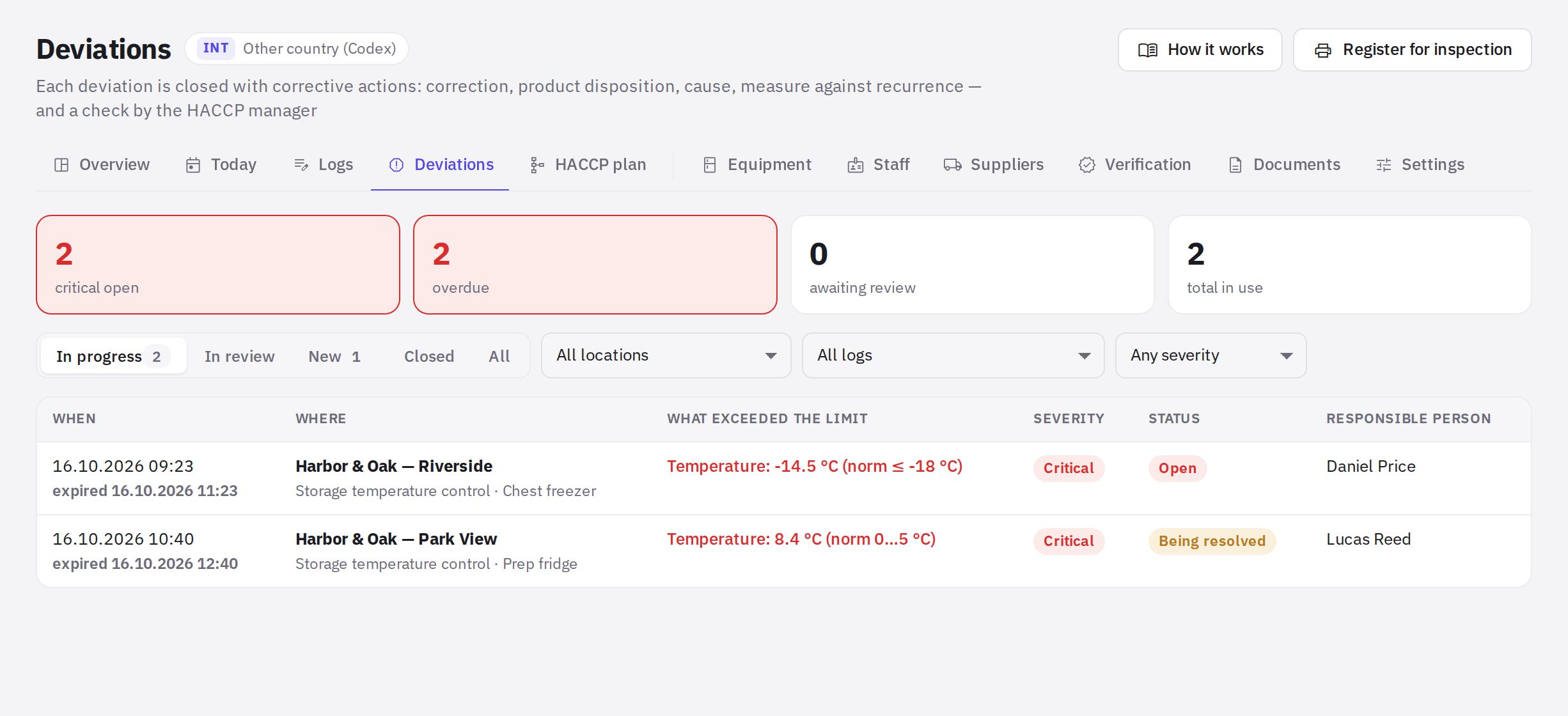
Step by step: resolve a deviation
-
Open the card. Click the deviation in the register, or Resolve on the Today page.
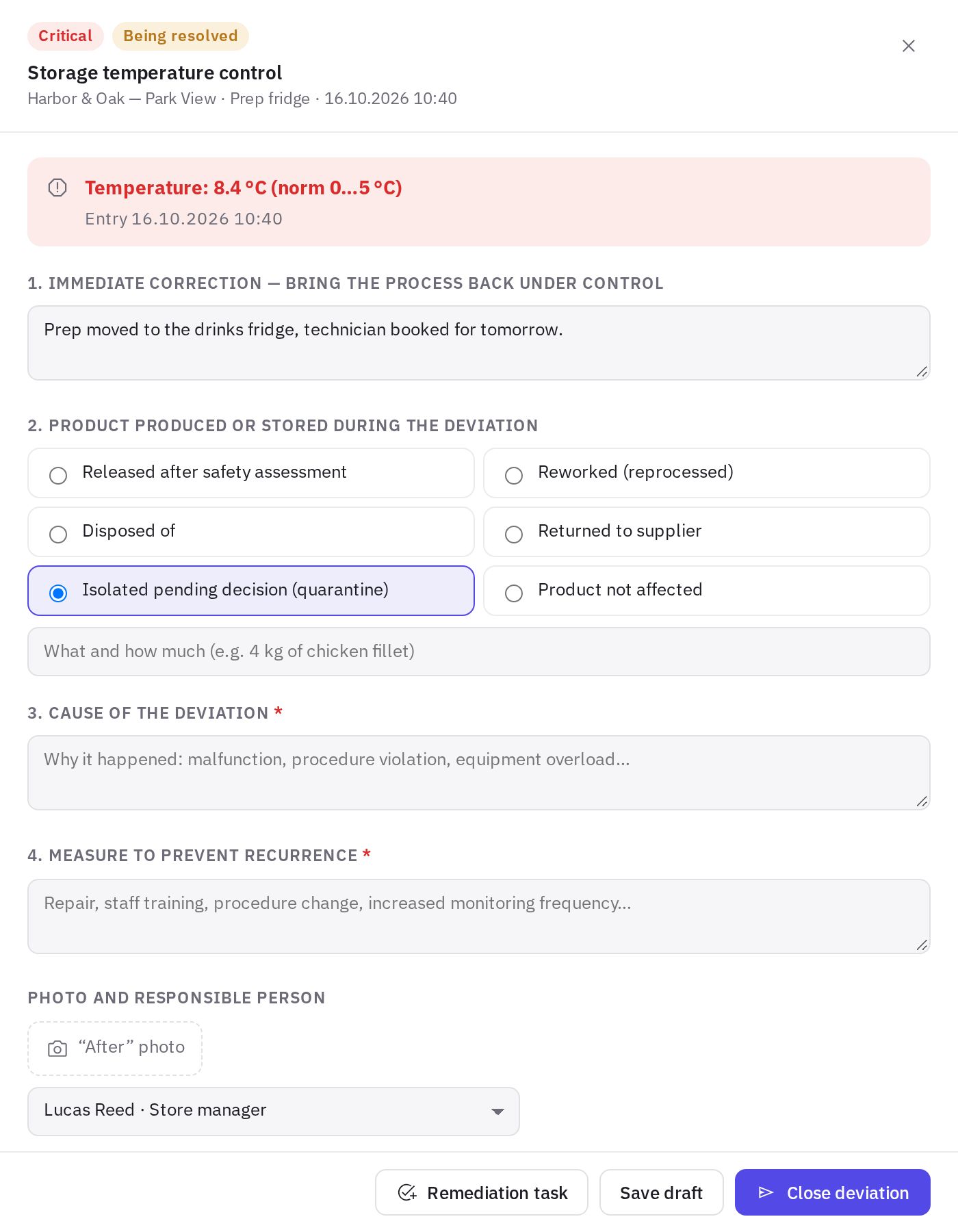
A deviation card with corrective actions -
Immediate correction. Describe how you brought the process back under control: for example, you moved the products to a working fridge.
-
Product decision. Choose one option: released after safety assessment, reworked, disposed of, returned to supplier, isolated pending decision (quarantine), or product not affected. Below you can specify what and how much.
-
Cause and preventive measure. Describe why it happened and what you'll do to prevent it from recurring. Both fields are required for a critical deviation.
-
Photo and responsible person. Add an “After” photo and choose the responsible person. If Photo required when closing a deviation is on in the log setup, the block has an asterisk, and without a photo the deviation can't be closed or submitted for review.
-
Submit. Save draft saves without submitting. Submit for review passes it to someone who is allowed to close the deviation. If you have that permission yourself (“Handling deviations”, or “Closing critical deviations” for a critical one), you see a Close deviation button instead.
Without a correction and a product decision (and a photo, if the log requires one), a deviation can't be closed or submitted for review — the system shows what's still missing.
Repeat measurement
After the correction, take a control measurement: on the Today page, click Repeat measurement next to the deviation. The entry is linked to the deviation, and the card shows whether the value is within the norm. If the repeat measurement is still out of limit, the deviation stays open.
Remediation task
If another employee will do the fix, click Remediation task: choose the Assignee and Due date and describe What to do. The task goes to the Tasks section; the assignee attaches an “after” photo and the task creator accepts the work. When the deviation is closed, the linked task is closed too.
In the mobile app, such a task is marked “HACCP deviation” and looks like an audit task: the assignee sees the “after” photo requirement and submits the task for review, and the task creator taps Accept or Return. See How to work with tasks in the mobile app.
Review and closing
A deviation in the “In review” status is checked by an employee with the “Handling deviations” permission at that location (by default, the location manager), and a critical one by an employee with the “Closing critical deviations” permission (for example, with the “HACCP technologist” role): Confirm and close, or Return for rework with a mandatory comment. An administrator can close any deviation. Permissions are set in Roles and permissions — this keeps doing the work separate from checking it.
Register for inspection
The Register for inspection button produces a printable register of deviations and corrective actions. A register for any period is also available in HACCP directories → Documents.
Frequently asked questions
Can I delete a deviation raised by mistake?
No. If an entry was made in error, you can correct it in the log with a reason, but the deviation must be closed with corrective actions. The history is kept for inspections.
Who gets notified about deviations?
Location managers are notified about a new deviation, and about a critical one also everyone with the “Closing critical deviations” permission at that location. You can turn these notifications off: HACCP settings → Deadlines and notifications → Notify about deviations. The deviation itself will still open and appear in the register. When actions are submitted for review, the notification goes to those allowed to close the deviation: with the “Handling deviations” permission, or “Closing critical deviations” for a critical one. When a deviation is returned for rework, the notification goes to the person responsible for it or, if no one is assigned, to the location managers.
Why doesn't the “Close deviation” button work?
Most likely some required fields are empty: the correction, the product decision and, for a critical deviation, the cause and the measure against recurrence. If the log requires a photo to close a deviation, add an “After” photo. This requirement is turned on and off in Logs → Log setup.
Thank you! This helps us improve the help center.