
Employee testing — overview
The Testing section helps you check whether employees know your standards, sanitation rules, menu and safety procedures. You build a test and assign it to people, positions or locations, and employees take it via a personal link — no login or password needed. Results are available right away, with a breakdown and a PDF report for every attempt.
Where to find it
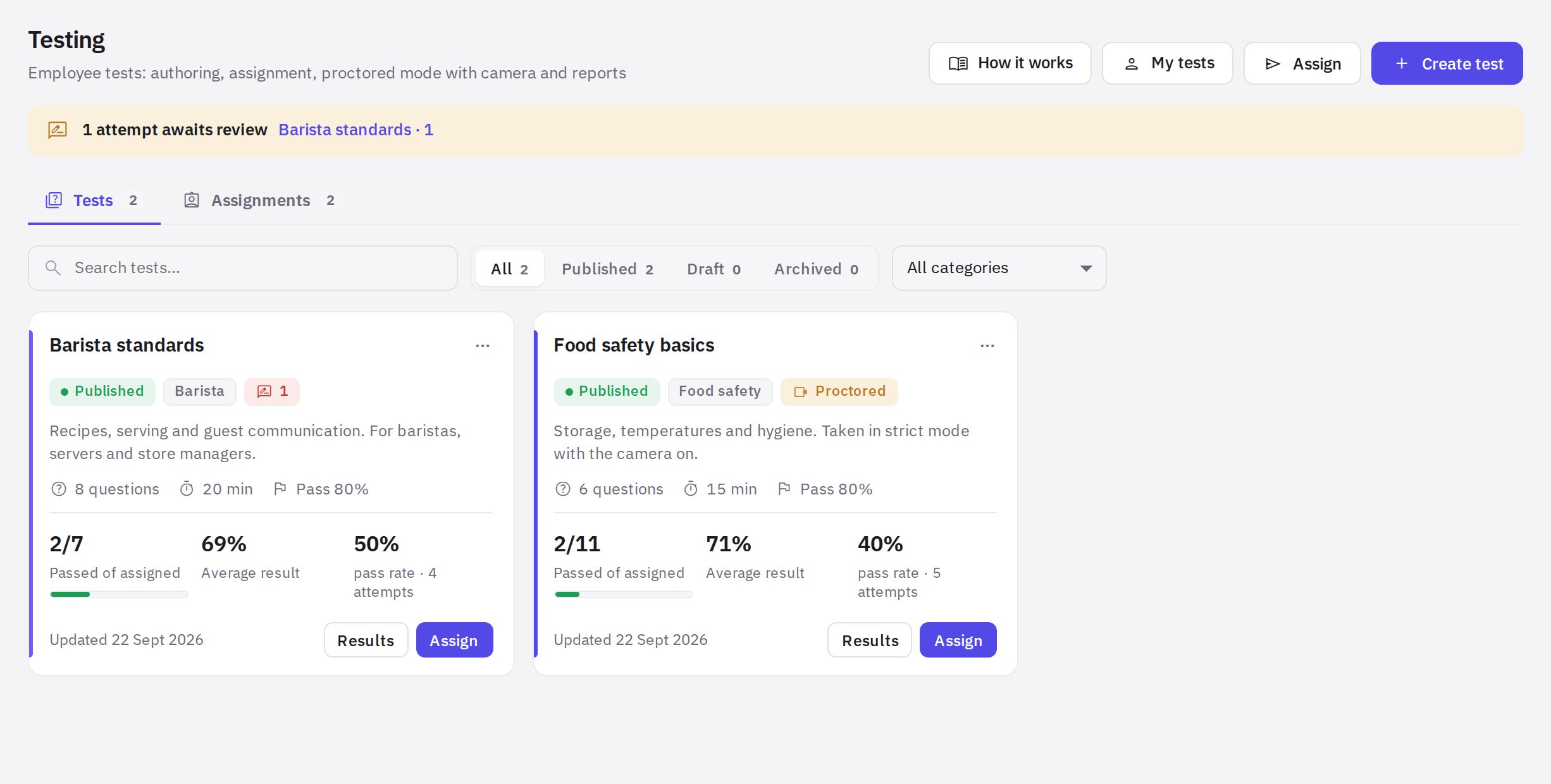
In the menu, go to Work → Testing. The page has two tabs: Tests and Assignments. In the header are the How it works (visual guide), My tests, Assign and Create test buttons.
Who can do what
- Company administrators and employees with testing permissions work with tests in Work → Testing: “Creating and editing tests” — create and edit tests; “Testing results” — assign tests and view results of employees at the locations where the permission applies; “Reviewing attempts and proctoring recordings” — grade answers, annul attempts, open the report and strict-mode snapshots (every view goes to the access log); “Exporting test results” — Excel. Permissions are granted in Roles and permissions.
- All other employees see only their own tests: the My tests page in the web dashboard, the personal link from the notification, or the mobile app. If such an employee opens Work → Testing, they are redirected to My tests.
How it works
- Test. Eight question types grouped into blocks; settings for time, passing score, attempts and what the employee sees after the test. While a test is a Draft, you can't assign it — Publish it first.
- Assignment. Who (the whole company, positions, locations, specific employees), from which date and by what deadline. Everyone gets a notification and a personal link.
- Taking the test. In the browser via the personal link or in the mobile app, depending on the test settings. Answers are saved at every step.
- Result. The employee sees as much of the result as you chose in the settings. You see all attempts, the answer breakdown, question analysis, PDF and Excel export.
Features
- Eight question types: single choice, multiple choice, true/false, short answer, number, ordering, matching, open answer.
- Critical questions: a mistake in one means “failed” regardless of the total score.
- Random selection from a block: each employee gets their own subset of questions.
- AI test from documents: upload procedures (PDF, Word, Excel, photos) or pick instructions — AI asks clarifying questions and suggests a ready-made test.
- Questions with AI based on a topic, text or document right in the builder, if AI is enabled for your company.
- Strict mode: camera, full screen and tab monitoring — website only.
- Certificate with a number in the PDF and recertification after a set number of days.
- Public link for candidates who don't have an account.
Articles in this section
- How to create a test
- How to create a test with AI from your documents
- How to assign a test and set deadlines
- How to take a test
- Strict mode with a camera
- Results, PDF and retakes
Frequently asked questions
Does an employee need an account to take a test?
They already have an account in your company — tests are assigned to employees. But they don't need to sign in: the personal link from the notification opens the test directly. For people without an account (candidates), there's a Public link in the test settings.
If I edit a test, will old results change?
No. Each attempt keeps the questions exactly as the employee saw them. Edits apply only to new attempts.
Thank you! This helps us improve the help center.