
Fraud flags and AI review of a mystery shopper form
When a shopper submits a form, jeCheck automatically checks it for signs of fraud: whether the shopper was at the location, how long they stayed, whether the photos are their own, whether there's a receipt. If AI features are included in your plan, an AI review is prepared as well. Both tools point you to what deserves a closer look; the decision is yours.
Check levels
The result of the automatic checks is shown on the visit card and in the list of forms in review:
- Checks passed — no flags with issues;
- Questions raised — at least one warning (yellow flag);
- Suspected fraud — at least one red flag.
A form with a red flag always comes to you for review, even if Coordinator review is turned off for the visit.
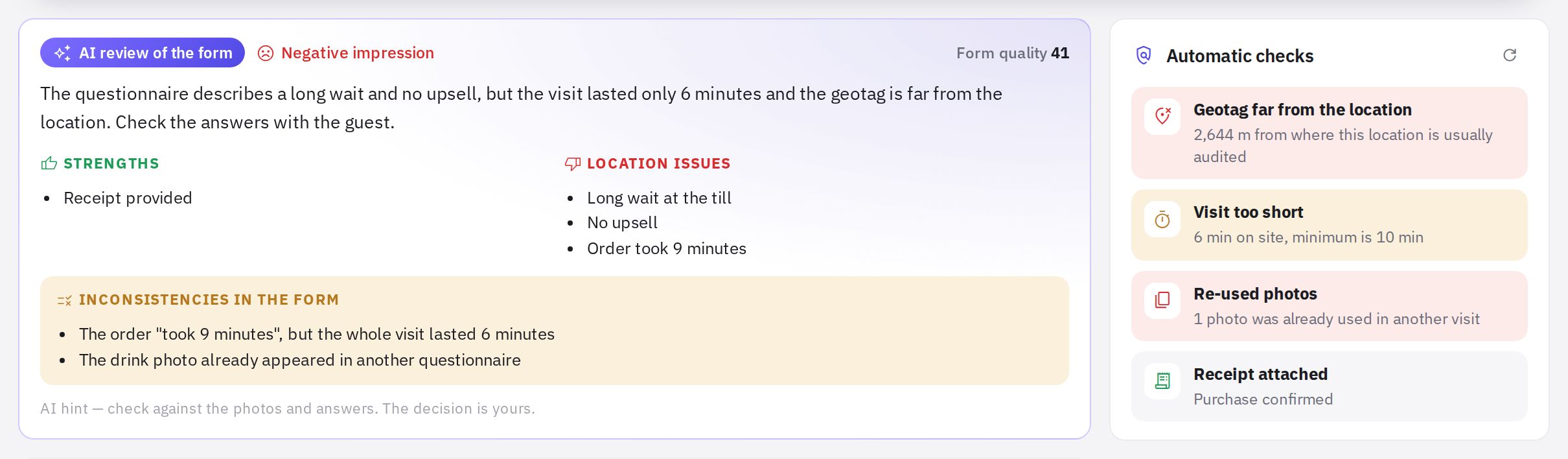
Which flags exist
| Flag | Level | When it appears |
|---|---|---|
| The shopper was on site | normal | the “I'm here” geotag is within the tolerance of the location |
| Geotag far from the location | red | the distance exceeds the tolerance (allowing for GPS accuracy) |
| No geotag | yellow | a geotag was required but the shopper didn't send it |
| Nothing to compare the geotag with | normal | the location has fewer than two audits with coordinates |
| Time on site / Visit too short | normal / yellow | time from “Arrived” to “Left” compared with the minimum minutes |
| Visit outside the window | yellow | the shopper arrived more than 15 minutes before or after the window |
| Form filled in late | yellow | the form was submitted 24 hours or more after the visit |
| Photos taken on another day | yellow | the photo capture date differs from the visit by more than 12 hours |
| Re-used photos | red | the same photo was already used in another visit |
| No receipt | red | a receipt was required but not uploaded |
| Receipt over the limit / Receipt attached | yellow / normal | the receipt amount compared with the reimbursement limit |
| No audio recording | red | the recording was required but is missing |
| Recording shorter than the visit / Audio recording attached | yellow / normal | the recording is shorter than half the time on site |
| Perfect, but no details | yellow | all answers are “Yes” and the impression is short |
| Same shopper at this location | yellow | this shopper has already been here in the last 60 days |
How the geotag is compared
Locations in jeCheck have no separate coordinates field. The location's reference point is the average (median) of the coordinates from past audits in the mobile app and from accepted mystery shopper visits. Until there are at least two such audits with coordinates, there's nothing to compare with — you'll see the “Nothing to compare the geotag with” flag. The tolerance is set in the wizard with the Geotag tolerance, m field.
On the visit card, the Geotag block shows a diagram: how many metres from the location and what the tolerance is. The Open on map link opens the place where the shopper checked in.
If the data has changed (for example, new audits with coordinates have appeared), click the refresh button in the Automatic checks block — the flags will be recalculated.
AI review of the form
After the form is submitted, an AI review of the form block appears on the visit card. It contains:
- a short summary of the visit and the tone of the shopper's impression;
- Strengths and Location issues;
- Inconsistencies in the form — for example, a “Yes” answer while the comment describes a problem;
- Form quality — how detailed and consistent it is;
- questions for the shopper — they appear as suggestions in the return-for-revision window, and you can add them to your comment with one click.
If the visit has an audio recording, AI transcribes it and checks the form against the conversation. The searchable transcript is shown below the player. Very large files aren't transcribed by AI, but you can still listen to the recording.
While the review is being prepared, you'll see an “AI review in progress” block. If it doesn't appear, click Run.
Flags and the AI review are hints, not a verdict. Before deciding, look at the photos, answers and timing yourself.
Frequently asked questions
Why is there a “Nothing to compare the geotag with” flag?
This location doesn't yet have at least two audits with coordinates — audits from the mobile app or accepted shopper visits. The flag isn't counted as an issue.
Is an AI review prepared for every form?
Yes, for every submitted form, if AI features are included in your plan. Even if the form was accepted automatically (coordinator review is off and there are no red flags), the review is prepared and appears on the visit card — you can look at it later.
Can the shopper or location staff see the flags?
No. Flags and the AI review are visible only in the Mystery shopper section — to administrators and employees with the “Mystery shopper questionnaires” permission.
Thank you! This helps us improve the help center.