
Web dashboard access and “App only” mode
Frontline staff — baristas, cooks, sales associates — usually don't need the web dashboard: their audits, tasks, tests and instructions are in the mobile app. For them you can turn on “App only” mode: the website is closed to them, and the app works as usual.
How to close or open access
-
Open the employee card. Go to Staff → Employees, click the employee's name and open the Access tab. The same is available in Management → Roles and permissions on the Employees tab — pick the employee.
-
Turn off the “Web dashboard access” switch in the Sign-in and administration block. To open access again, turn it on.
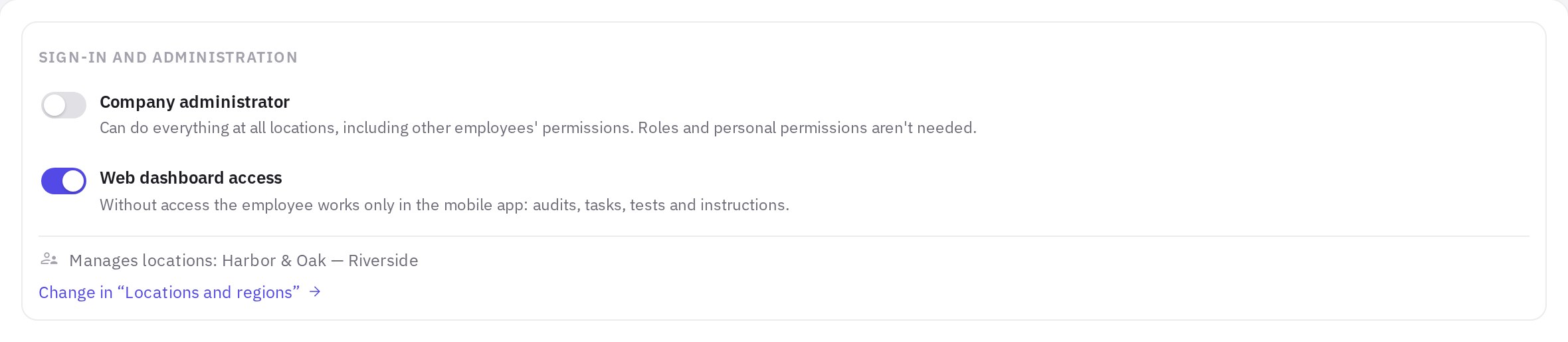
The employee card’s Access tab: the Sign-in and administration block
The change is saved immediately — there's no need to click Save.
A new employee created with Create user gets web dashboard access — close it after creation on the Access tab. When you onboard someone through Hiring, you choose the mode right away: Web and app or App only.
To switch several employees to this mode at once, tick them in the list, click Access in the action bar and choose App only.
In the list, employees without access have a phone icon in the Access column, and all of them are on the App only tab.
You can't close the web dashboard for administrators or the company creator — for them the switch is locked and always on.
Access can be changed by an administrator or an employee with the “Employee sign-in” permission — at the locations where this permission applies. Someone who has only this permission (without “Assigning roles and permissions to employees” and “Access log”) sees only the Sign-in and administration block on the card's Access tab. Every time access is opened or closed, it is recorded in the access log — see Roles and permissions.
What an employee without access sees
- On the website. When signing in, they see the message “Web dashboard access has been closed by your company administrator. Please use the jeCheck mobile app.” If they were already in the web dashboard when access changed, they are signed out on their next action.
- In the app. Everything works as before, with the same email and password: audits, tasks, tests and instructions. The app doesn't open links to the web dashboard (for example, in notifications) and instead says the section is available only in the web app.
What emails the employee gets
- Invitation. If you hire an employee in App only mode from the start, the invitation contains links to the mobile app instead of a link to the website.
- New password. When you reset the password or resend the invitation, an employee without access also gets an email meant for signing in to the app.
How this mode differs from deleting
| App only | Deleted | |
|---|---|---|
| Mobile app | works | blocked |
| Where it's turned on | the Web dashboard access switch on the Access tab | ⋯ → Delete |
Frequently asked questions
Can an employee without access change their password?
Password change is in the profile in the web dashboard, so an employee without website access can't change it there themselves. If the password needs changing, an administrator or an employee with the “Employee sign-in” permission chooses ⋯ → Reset password — the new password is emailed to the employee. If email isn't at hand, choose ⋯ → Temporary password: the employee signs in with it on the website, sets their own password and then uses it in the app — see How to add an employee and send an invitation.
Does this mode affect the plan?
No. Users don't affect the plan; the price depends only on the number of locations.
Can I close access for several employees at once?
Yes. Tick the employees in the list, click Access in the action bar and choose App only or Web and app.
Thank you! This helps us improve the help center.